
Insights From Solinas
After a sewer inspection, the field work may be complete, but the review has only begun.
Back at the office, a trained reviewer may need to manually go through 3–5 km of inspection footage, identify defects, and assess pipeline condition. This takes time, depends heavily on individual judgment, and becomes difficult to scale as inspection volumes grow.
That is where AI-assisted pipeline inspection software helps.
AI can flag and classify potential defects for reviewers to verify, making CCTV footage review faster, more consistent, and easier to manage at scale.
The camera captures the pipe. The software helps turn that footage into usable condition information.
What does pipeline inspection software do?
Pipeline inspection software organizes inspection footage into a structured record, linking each observation to the relevant asset and location while keeping supporting images and videos accessible for future review.
Imagine receiving hundreds of inspection videos over several months. Different crews have inspected different sections. Some recordings have detailed notes. Others need clarification. Then a complaint arrives about a pipeline inspected earlier in the year.
The answer may already be somewhere in the footage. Finding it is another task.
You may also hear terms such as CCTV inspection software, sewer inspection software, pipeline condition assessment software, or pipeline asset management software. Their functions may differ, but the important question remains the same:
Can the software turn inspection data into reliable information your team can find, verify, compare, and act on?
A useful inspection record starts with good inspection data
Software cannot add context that was never captured.
Imagine a reviewer spotting a damaged joint at 18.4 meters.
That sounds precise. But 18.4 meters from where?
The measurement becomes meaningful only when it is linked to the inspection start point, direction of travel, pipe ID, date, diameter, and material. If any of this information is missing, the observation should be marked as unverified until it can be confirmed.
Visibility matters too.
Lighting, camera movement, lens condition, sediment, and water levels can affect how much of a pipeline is actually assessable. An inspection may clearly cover the full section, stop at an obstruction, or pass through an area where much of the pipe wall remains hidden.
A video with few recorded defects does not necessarily mean a healthy pipeline. It could also mean that parts of the asset could not be properly assessed.
Good pipeline inspection software should make that distinction visible.
What defects can pipeline inspection software identify?
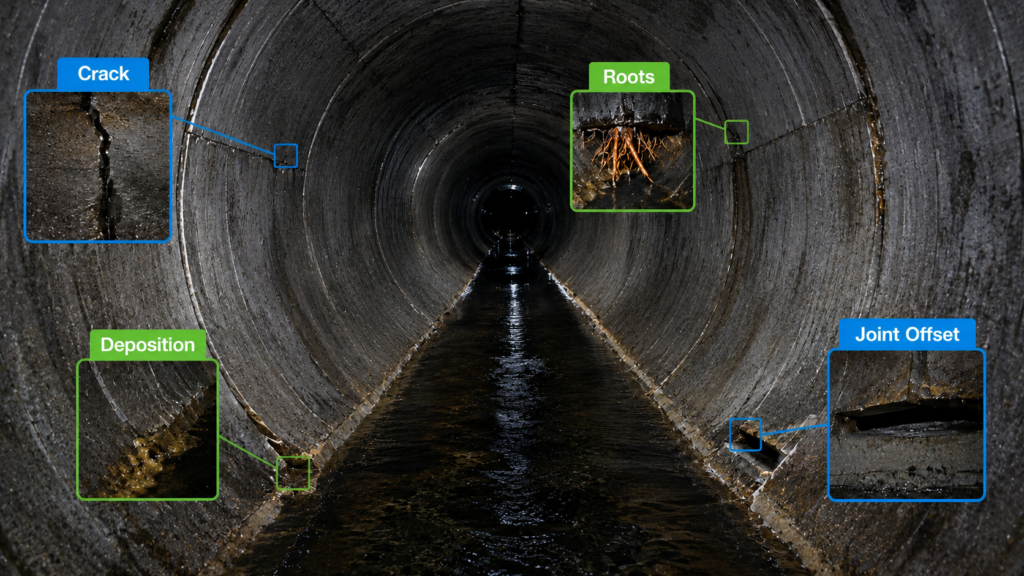
Depending on the inspection technology and pipeline type, software can help teams document visible:
- Cracks and Fracture
- Surface Damage
- Joint displacement
- Root intrusion
- Deposits and blockages
- Pipe deformation
- Attached deposit
- Infiltration
- Sediment accumulation
In a sewer, for example, footage may show roots entering through a joint or deposits restricting flow.
In a stormwater drain, the question may be different: Is sediment reducing available capacity? Is an obstruction limiting flow? Has part of the drain deteriorated?
The inspection provides evidence. The wider engineering decision may still require hydraulic conditions, asset history, operational context, or further investigation.
Why does the first defect identified not always receive repair priority?
Finding a defect and deciding what to repair first are different tasks.
Consider three pipeline sections.
The first has a major obstruction and repeated service complaints. Cleaning may need to be prioritised, followed by another inspection once the pipe wall becomes visible.
The second has a damaged joint with visible infiltration. It is also located on a critical route with limited alternatives if the section becomes unavailable.
The third has very few recorded defects. But deposits obscured much of the pipe wall. There may simply not be enough evidence yet to compare it confidently with the other two.
This is why pipeline condition assessment needs more than defect counts.
Teams may need to consider severity, consequences of failure, inspection confidence, maintenance history, and practical constraints before deciding what happens next.
What should a useful pipeline inspection report contain?
Imagine reopening the inspection six months later after the original operator has moved to another project.
Could another engineer understand what happened?
A useful report should make it clear:
What was inspected? → What was visible? → What was found? → Where was it found? → What still remains uncertain?
That typically means maintaining asset details, inspection dates, coverage, defect locations, supporting footage, assessment method, reviewer information, visibility limitations, and unresolved observations.
A PDF makes findings readable.
Structured data makes them reusable.
When a pipeline is cleaned, repaired, or inspected again, the new record can sit alongside the previous inspection, creating a condition history rather than another isolated file.
Who uses pipeline inspection software?
The same inspection may need to be served to several people.
Contractors need clear evidence and reports that meet client requirements.
Utilities may use inspection history to investigate recurring problems and prioritize maintenance or rehabilitation.
Consultants may return to original footage before recommending an intervention.
Industrial asset owners may use inspection findings to decide what can be addressed during limited maintenance or shutdown windows.
The application also matters. A gravity sewer, stormwater drain, water pipeline, and industrial pipeline can have very different inspection conditions.
Software, sensing technology, defect categories, and reporting methods should therefore be evaluated for the actual asset being inspected.
Inspections and decisions with Swasth AI
Swasth AI is Solinas’ AI-powered pipeline inspection software for analyzing inspection data and supporting pipeline condition assessment.
It brings together AI-assisted defect identification and classification, severity assessment, GIS mapping, dashboards, and reporting for pipeline inspection workflows.
Explore – Swasth AI
At Solinas, robotic inspection and software analysis are part of the same conversation. The starting point is not the dashboard. It is the evidence captured inside the pipeline and the decision a team needs to make with it.